What Is a CI/CD Pipeline?
A CI/CD pipeline is the automated system that takes code from a developer's commit to running software in production — with testing, building, and deployment happening automatically at each stage. CI/CD stands for Continuous Integration and Continuous Delivery (or Deployment), two related but distinct practices that together define how modern software teams ship.
Without a CI/CD pipeline, releasing software is a manual, error-prone process: developers merge code and hope it works, QA manually tests builds, deployment requires someone to SSH into servers and follow a runbook. This breaks down fast as teams and codebases grow.
With a well-designed CI/CD pipeline, every commit triggers an automated sequence: code is built, tests run, and (optionally) deployed — giving teams immediate feedback and making release a non-event rather than a stressful ritual.
CI vs. CD: What's the Difference?
Continuous Integration (CI)
CI is the practice of merging developer changes into a shared main branch frequently — multiple times per day — with automated builds and tests running on every merge. The goal is to catch integration issues early, before they accumulate into the classic "integration hell" that plagues teams that merge infrequently.
A CI system typically:
- Checks out the latest code on every push or pull request
- Installs dependencies
- Runs the full test suite (unit, integration, sometimes E2E)
- Reports pass/fail back to the developer within minutes
- Blocks merging if tests fail
The key discipline is keeping the main branch always green — deployable at any point. This requires small, frequent commits rather than large batches of changes.
Continuous Delivery (CD)
Continuous Delivery extends CI to automate the release process — so that every passing build can be released to production with a single click (or automatically). The emphasis is on keeping software always in a releasable state, with the deployment decision remaining a business choice rather than a technical barrier.
Continuous Deployment goes one step further: every passing build is automatically deployed to production without human approval. This is the practice at companies like Facebook, Netflix, and Amazon, where hundreds of deployments happen daily.
For most teams, Continuous Delivery is the right target: automated pipeline through staging, with a deliberate (but simple) production release gate.
Anatomy of a CI/CD Pipeline
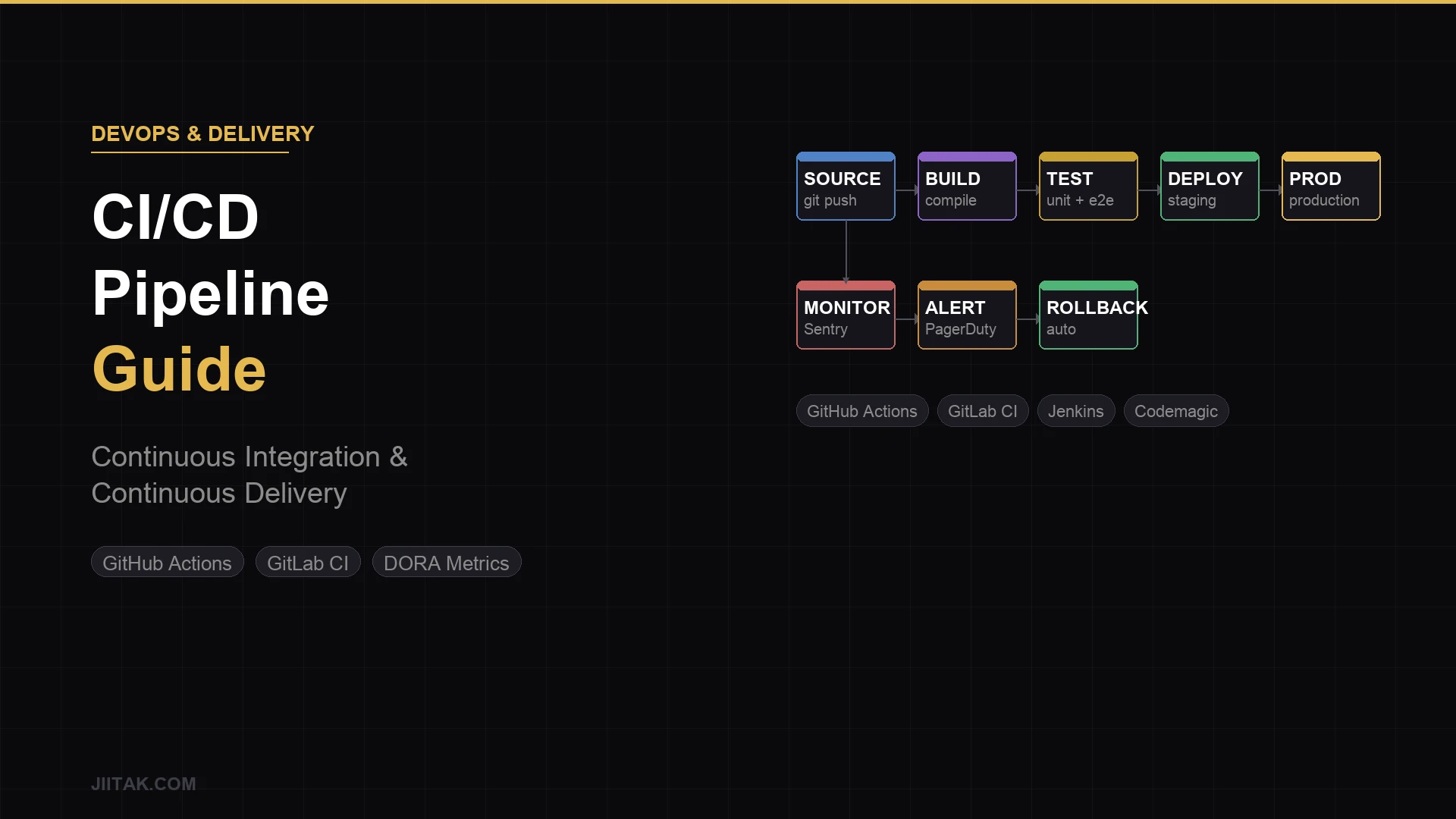
A typical pipeline has these stages, in order:
1. Source
The pipeline triggers on a code event: a push to a branch, a pull request opened, or a tag created. Most teams trigger CI on every PR and run full CD only on merges to main.
2. Build
The codebase is compiled, transpiled, or bundled. For a Node.js app, this is npm run build. For a Flutter app, it's flutter build apk or flutter build ipa. The output is a build artifact: a binary, a Docker image, a static site.
3. Test
Automated tests run against the build artifact or the source code. This stage is the most important — it's the safety net that makes the rest of the pipeline safe. Tests typically run in parallel across multiple test suites:
- Unit tests — fast, isolated, run in seconds
- Integration tests — test interactions between components (APIs, databases)
- End-to-end tests — simulate full user journeys (slower, run less frequently)
- Static analysis — linting, type checking, security scanning
4. Staging Deployment
If tests pass, the artifact is deployed to a staging environment that mirrors production. QA, product managers, and stakeholders can review the build here. Automated smoke tests or synthetic monitoring may run to verify the deployment is healthy.
5. Production Deployment
After staging approval (or automatically for continuous deployment), the artifact ships to production. Modern deployment strategies minimize risk:
- Blue/green deployment — run two identical production environments, switch traffic to the new one, keep the old one as instant rollback
- Canary releases — route a small percentage of traffic to the new version first, monitor metrics, gradually increase
- Rolling updates — replace instances one-by-one, never taking all of production down at once
- Feature flags — deploy code without activating features, toggle them independently of deployment
6. Monitoring and Feedback
Post-deployment, the pipeline connects to observability tools: error tracking (Sentry), performance monitoring (Datadog, New Relic), and alerting. Failed deployments trigger automatic rollback in mature setups. This stage closes the loop — turning production signals into the next iteration of development.
CI/CD Tools: What to Use in 2025
GitHub Actions
The default choice for most teams using GitHub. YAML-based workflows that run on GitHub-hosted runners. Excellent ecosystem of community actions (pre-built steps), tight integration with GitHub PRs and deployments, and free tier for public repos. The managed runner cost is the primary consideration at scale.
GitLab CI/CD
Built directly into GitLab, with a similarly powerful YAML configuration. The stronger choice for teams using GitLab for source control, or organizations that need self-hosted CI for compliance reasons. GitLab's pipeline visualization is best-in-class.
CircleCI
A hosted CI/CD platform with strong performance, good caching, and a large customer base. Popular in pre-GitHub-Actions era; still competitive for teams with complex pipeline needs and good support for Docker-based workflows.
Jenkins
The veteran open-source CI server with massive plugin ecosystem and complete flexibility. Requires significant operational effort to run and maintain. Worth the overhead for enterprises with specific compliance needs or deeply custom pipelines. Most teams starting fresh today would choose GitHub Actions or GitLab CI instead.
Bitbucket Pipelines
The natural choice for teams using Atlassian's Bitbucket. Simpler feature set than GitHub Actions but well-integrated into the Jira/Confluence ecosystem.
Specialized Tools by Platform
- Mobile (iOS/Android): Fastlane for build automation and App Store/Play Store deployment, combined with GitHub Actions or Bitrise
- Flutter: Codemagic is purpose-built for Flutter CI/CD — handles signing, building, and publishing to both stores
- Cloud deployments: AWS CodePipeline, Google Cloud Build, Azure DevOps for teams deep in those ecosystems
Setting Up Your First CI/CD Pipeline
Here's the practical sequence for a team implementing CI/CD for the first time:
Step 1: Start With CI Only
Get automated testing running on every pull request before worrying about automated deployment. A pipeline that runs your test suite and blocks merges on failure is already transformative, even without automated deployment.
Step 2: Automate Staging Deployment
Once CI is stable, automate deployment to a staging environment on every merge to main. This gives the team a always-fresh staging environment without manual deploys.
Step 3: Build Out Test Coverage
A pipeline is only as valuable as its tests. Map your critical user journeys and make sure automated tests cover them. Track test coverage over time and make adding tests to new code a non-negotiable part of the definition of done.
Step 4: Add Static Analysis and Security Scanning
Add dependency vulnerability scanning (Dependabot, Snyk), code quality analysis (SonarCloud), and secrets detection (Gitleaks) to your pipeline. These run fast and catch issues automatically.
Step 5: Automate Production Deployment
Once confidence in your test suite is high, automate production deployments with appropriate gates: staging sign-off, smoke test pass, monitoring health check. Start with low-risk services and expand from there.
CI/CD Best Practices
Keep Pipelines Fast
A CI pipeline that takes 30 minutes creates the habit of batching commits and ignoring feedback. Target under 10 minutes for CI. Use parallelization, test sharding, and aggressive caching (dependency caches, Docker layer caches, build caches) to hit this target.
Fail Fast, Fail Early
Run the fastest, cheapest checks first: linting before tests, unit tests before integration tests, integration tests before E2E. A linting failure found in 30 seconds costs nothing. The same failure found after a 20-minute test run costs the team's time and context-switching overhead.
Test in Production-Like Environments
Tests that pass in CI but fail in production usually fail because the environments differ. Use Docker containers to make CI environments match production. Seed databases with realistic data. Test against real external services in integration tests, not mocks.
Treat Pipeline Configuration as Code
Pipeline YAML files live in the repository alongside the code they build. Changes go through PR review like any other code change. Pipeline configurations get tested before they're deployed (GitHub Actions has act for local testing).
Monitor Pipeline Health
Track flaky tests (tests that sometimes pass, sometimes fail without code changes) — they erode trust in the pipeline and waste time. Track build duration over time. A pipeline that's getting slower signals accumulating technical debt in the test suite or build configuration.
Don't Skip the Pipeline
The fastest way to destroy a CI/CD culture is to routinely bypass it: merging without tests passing, deploying hotfixes manually, or using --force flags to override failures. The pipeline's value comes from consistent enforcement. One exception becomes a precedent.
CI/CD for Mobile Apps: Special Considerations
Mobile CI/CD has additional complexity that web teams don't face:
- Code signing — iOS and Android require cryptographic signing with certificates and provisioning profiles managed securely in CI
- Multiple targets — debug, release, different environments, different build flavors
- App store submission — automated submission to App Store Connect and Google Play via Fastlane or Codemagic
- Device testing — Firebase Test Lab, AWS Device Farm, or BrowserStack for running tests on real devices in CI
- OTA updates — React Native and Flutter (via Shorebird) can ship JS/Dart layer updates without a full App Store release cycle
At JIITAK, every Flutter project ships with a CI/CD pipeline from day one: automated testing on PR, staging builds on merge, production releases triggered by version tags with automatic store submission. It's part of what makes our delivery predictable.
The Business Case for CI/CD
Teams that invest in CI/CD ship more frequently, with fewer bugs, and with faster incident recovery. The DORA Research Program (Google) has studied this extensively: Elite performers deploy multiple times per day, with change failure rates under 5% and MTTR under 1 hour. Low performers deploy monthly or less, with change failure rates over 15% and MTTR measured in days.
The correlation between CI/CD maturity and business outcomes is consistent: faster delivery, better reliability, and higher developer satisfaction. The investment in pipeline setup pays back within the first quarter of operation for any active product.
Getting Started
If your team is still deploying manually or running tests locally before pushing, the first CI/CD pipeline is the highest-leverage investment you can make. Start simple: pick GitHub Actions or GitLab CI based on where your code lives, add a workflow that runs your tests on every PR, and iterate from there.
If you're building a new product and want engineering that ships predictably from the start — with CI/CD, automated testing, and deployment pipelines built in — talk to JIITAK. We've shipped 70+ products and CI/CD is non-negotiable on every engagement.