
.png)
The "Lucid" Intelligence Engine
1. The "Hello World" Lie
If you look up "How to build an AI Chatbot" online, you get a simple recipe: Upload PDF -> Vectorize -> Ask Question.
We're here to tell you that this recipe fails in production.
We were tasked by a boutique M&A (Mergers & Acquisitions) firm to build a system that could read thousands of financial audits and legal contracts. The goal? To answer questions like: "What is the liquidity risk if the merger is delayed by 6 months?"
When we tried the standard "YouTube Tutorial" approach (Naive RAG), the AI failed miserably. It missed crucial footnotes. It conflated "Revenue 2023" with "Projected Revenue 2024."
The Result? The partners didn't trust it. A tool without trust is useless.
The Pivot: We stopped building a "Chatbot" and started building a "Citational Reasoning Engine." We realized that the retrieval of data matters 10x more than the generation of the answer.
2. Deep Tech: The "Hybrid Search" Revolution
We discovered that Vector Search (Semantic Search) is great for concepts but terrible for specific keywords (like "Clause 4.2" or "Project Titan").
We implemented a Hybrid Search Architecture:
- Dense Retrieval (Vector): Using OpenAI text-embedding-3-large to capture the meaning of the query.
- Sparse Retrieval (BM25): Using an inverted index (like an old-school search engine) to capture specific keywords and numbers.
The Secret Sauce (Re-Ranking): We added a "Judge" in the middle. We used Cohere’s Re-Rank model. It takes the top 50 results from both searches, reads them deeply, and re-orders them based on relevance before sending them to GPT-4.
3. The "Chunking" Dilemma
Most developers just chop documents into 1000-character blocks. This breaks sentences and context. We developed a "Semantic Chunking" algorithm. We programmed the ingestion pipeline to respect the structure of the document—keeping headers, tables, and paragraphs intact.
4. The Frontend: A "Decision Dashboard," Not a Chat Window
The client didn't just want text; they wanted visibility. A chat box hides the work. A dashboard reveals it.
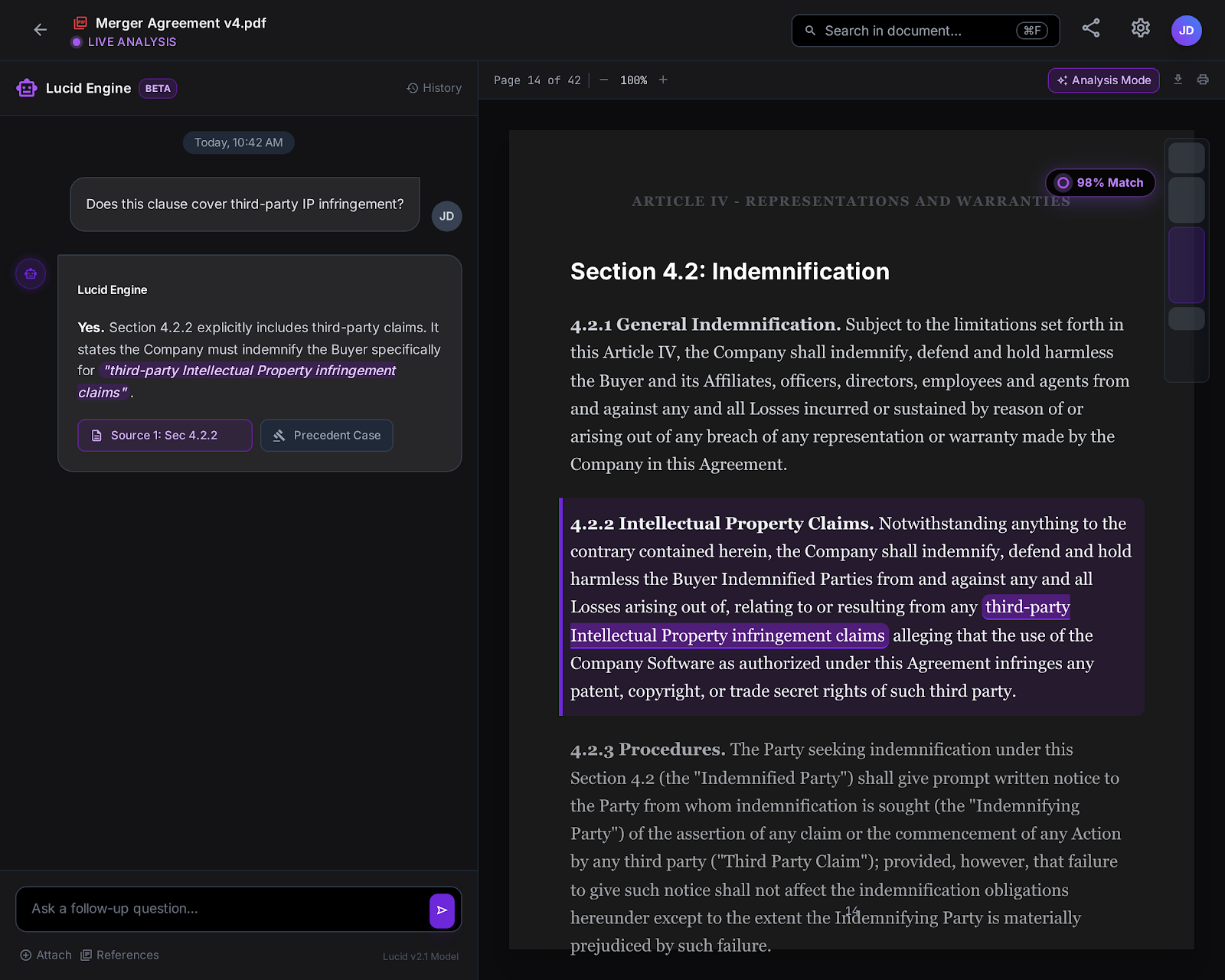
We built a custom Next.js (React) interface designed for "Dual-Pane Analysis."
- Left Pane: The Chat/Reasoning Interface.
- Right Pane: The "Source Truth" Viewer. When the AI cites a document, the PDF opens instantly on the right, highlighting the exact paragraph used.
This UX choice reduced the "Time-to-Verification" for lawyers from 15 minutes to 30 seconds.
5. Architecture & Pipeline Visualization
We need to show the complexity of the "Hybrid" pipeline.
- Left: 'Raw PDFs'.
- Middle Top: 'Vector Database (Pinecone)'. Middle Bottom: 'Keyword Index (BM25)'.
- Convergence point: A glowing node labeled 'Cross-Encoder Re-Ranker'.
- Right: 'GPT-4 Inference'.
The lines connect in a circuit-board style. Detailed labels, high contrast white lines on dark blue background, isometric view."
6. Cost & Latency: The Trade-Offs
We believe in transparency. The "Re-Ranking" step adds intelligence, but it also adds latency. We optimized this by caching frequent queries.
7. Personal Reflection: The "Trust" Threshold
The moment we knew we succeeded wasn't when the code worked. It was during a demo with the Senior Partner.
He asked the AI a trick question about a hidden clause in a 200-page lease agreement.
The AI replied: "The lease allows subletting, BUT only with written consent within 14 days (See Page 42)."
And then, the dashboard snapped to Page 42, highlighting the line.
The Partner looked at us and said, "Okay. I can use this."
That is what we sell. We don't sell AI. We sell the confidence to make decisions.
.png)
.png)
.png)